From 69 to 97 on web vitals: What could be improved in the PN Imóveis showcase
How I fixed LCP down from 6.8s to 2.0s and boosted Nuxt 4 performance from 69 to 97 by fixing inline CSS, selective SSR, images, and caching.
From 69 to 97 on Core Web Vitals: What could be improved in the PN Imóveis showcase
The Performance score for the pnimoveis.com.br homepage on Lighthouse went from 69 to 97. LCP — the time until the largest visible element renders — dropped from 6.8s to 2.0s on a mid-tier mobile device over a slow 4G network. Accessibility rose from 84 to 96, SEO went from 83 to 100, and WhatsApp link previews started working properly with rich thumbnails and prices.
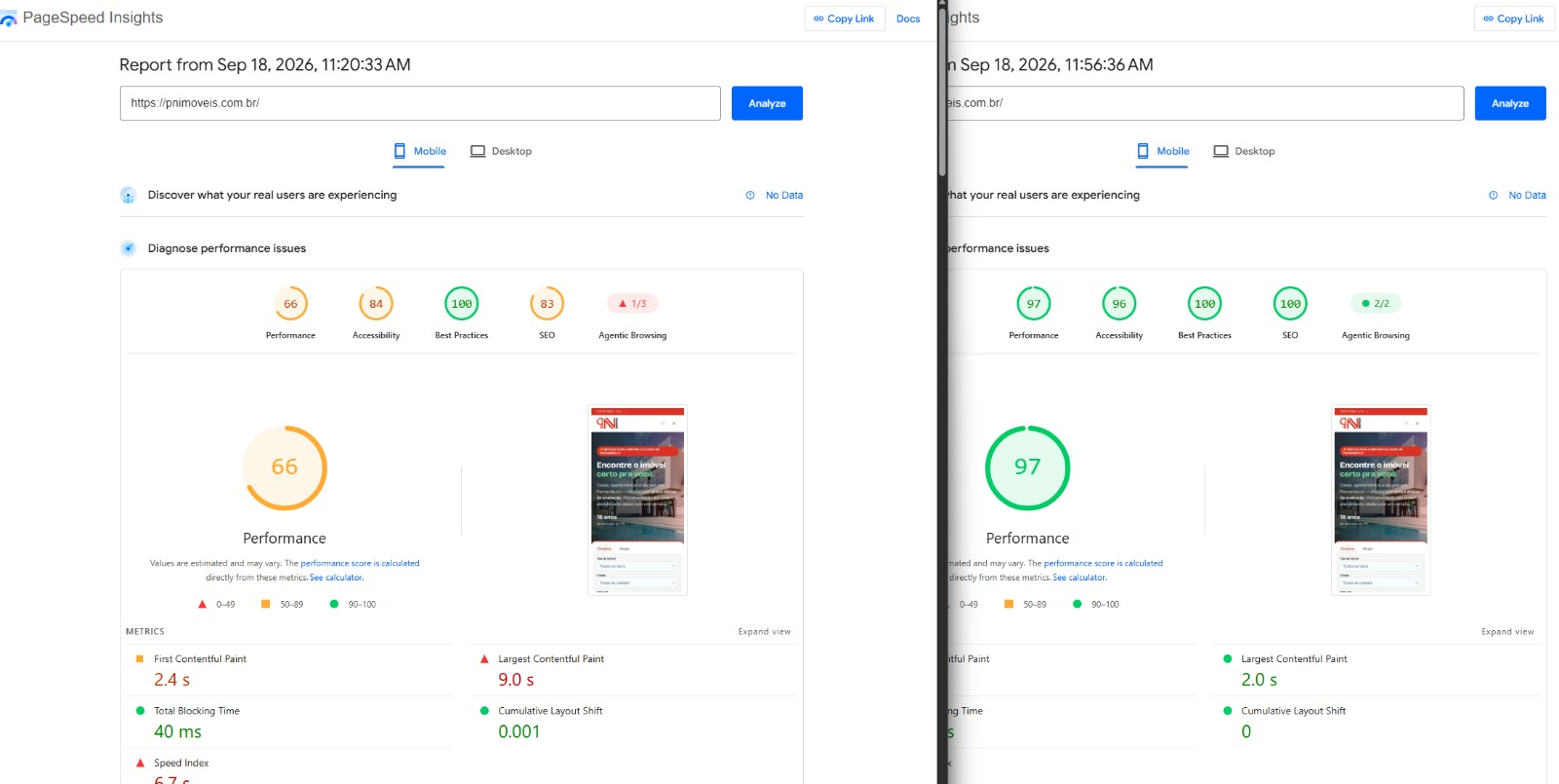
This post documents the journey: what we uncovered, why each bottleneck hurt, what we refactored, and how we solved each performance issue.
| Metric | Before | After (Production) |
|---|---|---|
| Performance | 69 | 97 |
| Accessibility | 84 | 96 |
| Best Practices | 96 | 100 |
| SEO | 83 | 100 |
| First Contentful Paint | 2.5 s | 1.2 s |
| Largest Contentful Paint | 6.8 s | 2.0 s |
| Speed Index | 4.1 s | 2.9 s |
| Cumulative Layout Shift | 0.004 | 0 |
| Total Blocking Time | 170 ms | 130 ms |
| Transferred Bytes (Homepage) | 2.8 MB | ~0.6 MB |
The Application
PN Imóveis is the public real estate portal for an agency based in Pernambuco, Brazil. It includes a homepage with featured properties, a search interface with filters, individual property pages, and an administrative dashboard for brokers. Stack: Nuxt 4 (Vue) with PrimeVue, API running in the same Nitro process, self-hosted PostgreSQL via Supabase on a VPS managed by Coolify. Property photos are hosted on Supabase Storage behind a Cloudflare CDN.
An early architectural decision played a major role: the entire application was built as a Single Page Application (SPA) with ssr: false. The server served a blank HTML shell, and the client browser rendered everything via JavaScript. While suitable for an admin panel, it proved problematic for a public showcase.
The Audit Report Was Generic. curl Revealed the Truth.
We started with a Lighthouse: Performance 69, LCP 6.8s, and generic audit recommendations like "Use efficient cache lifetimes (1,352 KiB)", "Reduce unused JavaScript (692 KiB)", and "Improve image delivery (1,190 KiB)".
To get actionable details, we fetched the raw page using curl and inspected the response payload.
| Resource | Size | Cache | Finding |
|---|---|---|---|
| Homepage HTML | 501 KB | None | An SPA shell should be ~10 KB. It contained 462 KB of embedded inline CSS. |
| Entry JS Bundle | 504 KB (146 KB gzipped) | 1 year | Globally registered all ~90 PrimeVue components. |
| Hero Image | 359 KB (1920px JPEG) | None | It was the LCP element, hidden inside CSS background-image. |
| Property Card Image | 500–565 KB (2000px WebP) | 4 hours | Rendered in a small 400px card container. |
| Fonts & Logos | 17–85 KB each | None | Served without any Cache-Control header. |
/robots.txt | 67 KB | — | Returned the full SPA HTML page to web crawlers. |
| Icon Sprite | 238 KB SVG | — | Inlined into the DOM on every public page inside the JS bundle. |
<link rel="prefetch"> | 158 links | — | Prefetched every build chunk, competing for bandwidth with critical assets. |
Each item translated a generic Lighthouse warning into a clear engineering target. The first row alone explained a major portion of the initial load delay.
Issue 1: Half a Megabyte of CSS Injected into Empty HTML
The PrimeVue Nuxt module had a default setting that pre-injected component theme CSS into the <head>. Without an explicit list of used components, it injected styles for every component — autocomplete, cascadeselect, treetable, terminal, dock, org chart, etc. This resulted in 184 <style> blocks totaling 462 KB on every HTML response for an SPA shell that rendered no initial DOM content.
This payload was uncacheable (being raw HTML) and had to be parsed before any rendering could take place. Lighthouse categorized this as "Unused JavaScript" because the same CSS strings existed inside the JS bundle.
We disabled global style injection (loadStyles: false) and registered only the components required by the app. The initial HTML payload dropped from 501 KB to 10 KB.
Later, when migrating the public pages to SSR, style injection was re-enabled selectively only for the ~12 components rendered during server side generation.
Issue 2: The LCP Image Was Hidden Behind 3 Network Roundtrips
The largest contentful element on the homepage is the hero background photo. It was defined via CSS background-image. To request this asset, the browser had to:
- Download and parse the HTML shell.
- Fetch and execute the JavaScript application bundle.
- Wait for the blocking API fetch call on initial page setup.
- Mount the DOM tree.
- Parse the CSS rules to discover the image URL.
- Trigger the 359 KB JPEG download.
On slow 4G networks with high RTT (~150ms), the hero image only began downloading after ~4 seconds.
Fixes Applied:
- Native
<img>tag withfetchpriority="high": Enabled the browser's preload scanner to discover and fetch the image immediately upon receiving HTML. Added responsivesrcset(800/1200/1600 px), reducing mobile image downloads to 34 KB. - WebP Conversion: Optimized the 1600px asset from 359 KB down to 98 KB.
- Non-blocking API Fetching: Made the hero section render immediately with static elements, while fetching property listings asynchronously via
useLazyFetchwith skeleton loading states.
Issue 3: Oversized Images in Small Cards with Short Caching
During upload, images were processed to 2000px WebP files — suitable for full-screen property galleries, but excessive for 400px property cards on search pages. This sent ~500 KB per card across 6 featured listings on the home page.
Additionally, Supabase Storage served assets with Cache-Control: max-age=3600 (4 hours). We updated headers and Cloudflare CDN caching rules to 1 year (max-age=31536000, immutable).
What if an image needs to be updated? We follow standard Cache Busting: whenever an image is updated or replaced, its URL path or filename is updated with a new version or hash (e.g., adding a version suffix or content hash). Because the URL changes, browsers recognize it as a brand-new asset and fetch it immediately, safely bypassing the 1-year cache of the old URL.
Explicit width and height attributes were added to all property image components via API DTO payload data, eliminating layout shifts.
Issue 4: Eliminating Micro-Gargoyles
Small inefficiency sources accumulated into substantial overhead:
- Uncached Static Assets: Configured Nitro route rules to serve static fonts with 1-year immutable caching and static images/icons with 30-day cache durations.
- 158 Automatic Prefetches: Disabled automatic route chunk prefetching via build manifest hooks. Replaced it with viewport-intersection prefetching via
<NuxtLink>. - 238 KB SVG Icon Sprite: Replaced a large inline Vue icon component with an external SVG sprite hosted in
public/, compressed with SVGO, and referenced using<use href="/icons/sprite.svg#icon-name">. - Icon Font Blocking: Self-hosted the
.woff2font withfont-display: swapand preloading. - Accessibility & SEO: Added
aria-labelattributes to icon-only buttons, fixed header hierarchy (h2toh4), added canonical links and meta descriptions, and adjusted brand green text contrast to pass WCAG AA standards (4.5:1 minimum).
The Pivot: Selective SSR for Public Pages
With core optimizations in place, we switched the public showcase to Server-Side Rendering (SSR).
The primary driver was social link previews. When brokers shared property links on WhatsApp or social networks, the previews rendered blank thumbnails without pricing or titles because preview bots do not execute client-side JavaScript.
Using Nuxt routeRules, we configured a hybrid rendering model:
- SSR enabled by default: For homepage, search, landing pages, and individual property pages.
ssr: false(SPA): For the administrative panel, authentication screens, and user favorites (which rely entirely on clientlocalStorage).
// sample
export default defineNuxtConfig({
  routeRules: {
    '/dashboard/**': { ssr: false },
    '/checkout': { ssr: false },
    '/catalog/**': { swr: 3600 }
  }
})
SSR Hydration Edge Cases Fixed:
- Hydration Mismatches: Ensured
localStoragereads and non-deterministic operations (such as array shuffling) run insideonMountedrather than top-level setup. - Server-side Reactivity: Replaced
watchhandlers populating data arrays with reactivecomputedproperties. - PrimeVue Context Services: Preserved
<Toast />and<ConfirmDialog />instances in the root layout to maintain global service registration foruseToast().
Delivery Optimization: Compression & Chunk Bundling
To ensure optimal transport performance, we tuned Nitro and Rollup:
- Brotli Server Compression: Implemented a Nitro server plugin to pre-compress SSR HTML responses using Brotli/Gzip before reaching the reverse proxy, shrinking raw HTML payloads from 196 KB to 24 KB.
- Rollup Chunk Consolidation: Merged fragmented JS build files (74 of which were smaller than 10 KB). Reduced total build chunks from 101 to 71, and homepage JS requests from 44 down to 19.
- Hero Image Preloading: Injected HTTP
Link: rel=preloadheaders withimagesrcsetso the browser prioritizes the hero image at the top of the network waterfall.
Key Takeaways
- Inspect Raw Payloads: Automated summaries highlight symptoms, but raw
curlinspection exposes root causes like hidden inline styles. - SSR Drives Conversion: Rich WhatsApp previews and search engine indexing are core business requirements for public portals.
- Hydrate Mindfully: Client-only state (storage, media queries, randomness) must initialize neutrally during SSR and update post-mount.
- Target Critical CSS: Prune UI framework CSS imports so only active components load in critical rendering paths.
Summary
We transformed an SPA serving 500 KB of unused inline CSS into a selective SSR application with 24 KB Brotli-compressed HTML, preloaded hero image, and full social preview support — raising Lighthouse Performance from 69 to 97 and cutting LCP from 6.8s to 2.0s.